
Where to see an itinerary's time zone
This version's App Store notes say time zones are clearer. In the current app, an itinerary's Overview names its time zone.
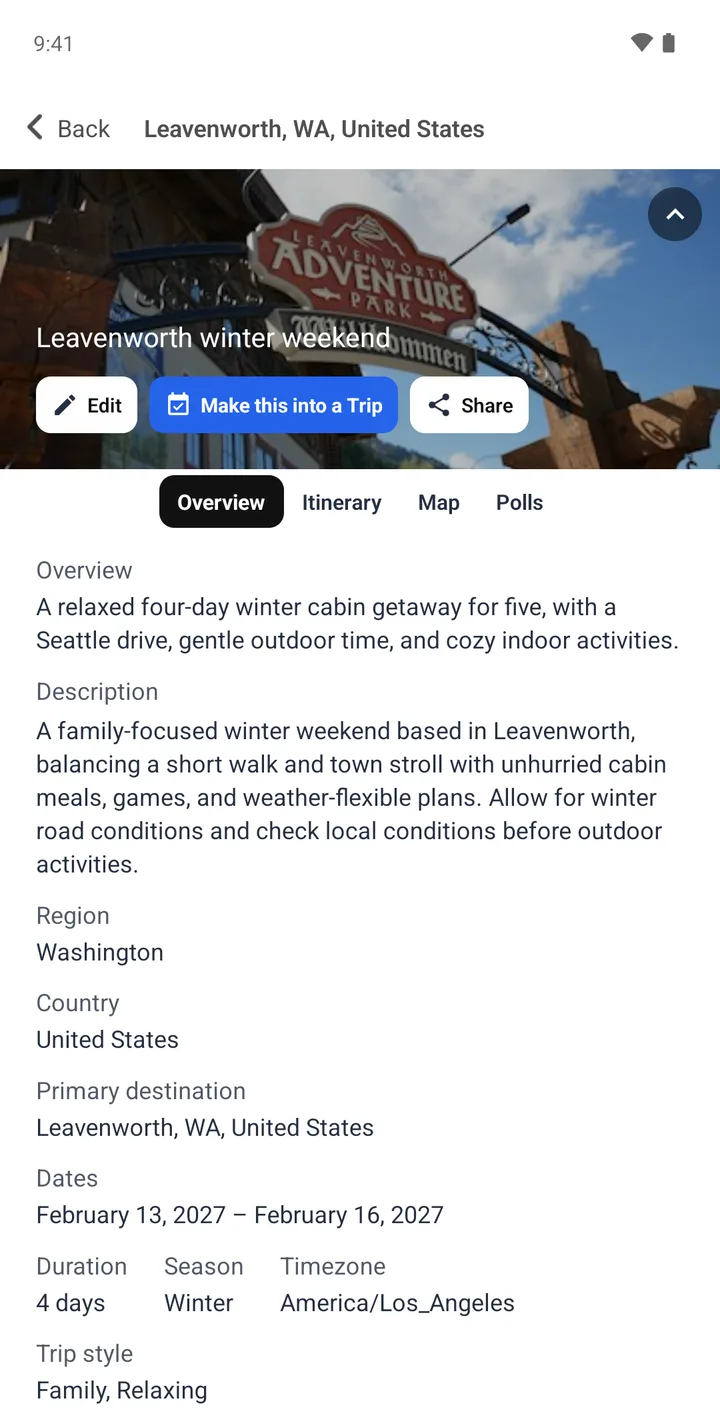
To see it, go to the Calendar tab, tap the view button left of the date and choose Travel. Then tap Itineraries and pick one: its Overview lists the dates, how many days, the season and the time zone, such as America/Los_Angeles for a weekend in Leavenworth.
From the store listing
From the release notes Podz published on the App Store.
Better Planning. Smoother Experiences. More Time Together.
We've made Podz faster, more reliable, and easier to use, with improvements to trip planning, itineraries, events, and everyday organization.
SMARTER TRAVEL PLANNING
• Build better itineraries. Enjoy a smoother experience creating and refining trips, with improved navigation, faster updates, and fewer interruptions.
• Explore your trip, day by day. View daily itinerary maps, move between days, and see how your activities and destinations fit together.
• Keep travel details organized. Flights, trains, and rides are easier to manage with clear routes, departure and arrival times, locations, and booking details.
• Plan with confidence. Improved location accuracy, clearer time zones, and more reliable directions help keep your travel plans on track.
EASIER EVERYDAY ORGANIZATION
• Simplify meals and groceries. Add recipe ingredients to grocery lists, assign shoppers, and organize meals with less effort.
• Keep important details handy. Add confirmation and booking information to any event, with easier-to-read event details.
• Enjoy a smoother Podz experience. We've improved itinerary updates, event displays, account registration, and overall performance and reliability.
Your people. Your plans. One shared place.
Steps checked on Android; iPhone screens may look slightly different. Checked in Podz 2.20.55 on Nov 10, 2026.
